
instax Pal 2: All 30 Effects Explained, Plus Specs & Price
Fujifilm announced the instax Pal 2 on September 15, 2026. At about 87 grams, it is a palm-sized digital toy camera with a USB-C port, a tiny top display, physical dials, and a shutter button. It does not print film on its own. Instead, it pairs with instax Link printers or transfers photos to your smartphone.
Before getting into its creative quirks, here are the specs, pricing, and release dates.
Specs, Price & Release Date at a Glance
| Specification | Details |
|---|---|
| US Release & Price | Late September 2026 · $169.95 (CAD 219.99 in Canada) |
| Japan Release & Price | October 9, 2026 · Open pricing |
| Sensor & Lens | 1/3.06-inch CMOS · 28mm equivalent F2.2 · AF from 8cm with face detection · no zoom |
| Resolution | 10MP (3776×2832) or 1MP (1280×960) |
| Viewfinder & Display | Optical viewfinder + 1.30-inch top TFT screen (~170k dots, can work as a waist-level finder) |
| Dials & Controls | Left dial (6 effects), center joystick, right lever (format & burst mode) |
| Shooting Formats | No Frame (4:3), mini (3:4), SQUARE (1:1), WIDE (16:9) |
| Storage | Internal memory (~100 shots) · microSD up to 2TB |
| Connectivity & Power | USB-C (~0.7s per full-size photo to a phone) · Bluetooth 5.3 LE (~15s per photo, 1280×960 only) · built-in lithium battery, 2–3 hours to charge |
| Dimensions & Weight | 37 × 42 × 92.3 mm · about 87g · black or white |
| What early reviews say | Noticeable shutter lag · tends to overexpose · exposure compensation (±2EV) is buried in menus |
Thirty effects, and not one word of explanation
When Fujifilm's Pal 2 site went live, we noticed a gap. The camera introduces thirty effects in five themes. For every effect, the official site gives a name and a single sample photograph.
And that is all. On every regional version of the site we checked, there is not a single sentence explaining what any effect does to your photograph. If you want to know whether "Muted" desaturates colors or deepens shadows, whether "Crystal" is a prism or a blur, or which six effects are worth loading onto the dial, you are on your own.
We are the team behind Toasto, an instant camera app for iPhone, and building lens effects is our day job. So we went through all thirty samples one by one and wrote down what we saw. Three of them — Crystal, Pixel, and Screen — led directly to new lens effects we shipped in Toasto 1.2.0 on September 18.
Along the way, we came to think the Pal 2 is interesting less for its specs than for what it refuses to let you do.
You can't undo a Pal 2 photo, and the dial only holds six
In 2026, digital imaging is obsessed with safety nets. Smartphones shoot multi-frame RAWs. Photo apps offer non-destructive sliders, letting you change filters hours or weeks after capture. If you make a mistake, you hit undo.
The Pal 2 is a digital camera, but Fujifilm made two stubborn decisions:
- Effects cannot be undone after capture. Fujifilm's FAQ says so explicitly: effects can only be applied while taking the shot, and cannot be applied to or changed on a photo afterwards.
- You can only carry six effects on the camera at any time. The companion app stores all thirty, but the dial has six stops. You commit to a palette before you walk out the door.
That friction is a large part of why instant photography is fun. The point of an analog camera was never the cost of film; it was the consequence of pressing the shutter. When you know you cannot change your mind later, you compose differently.
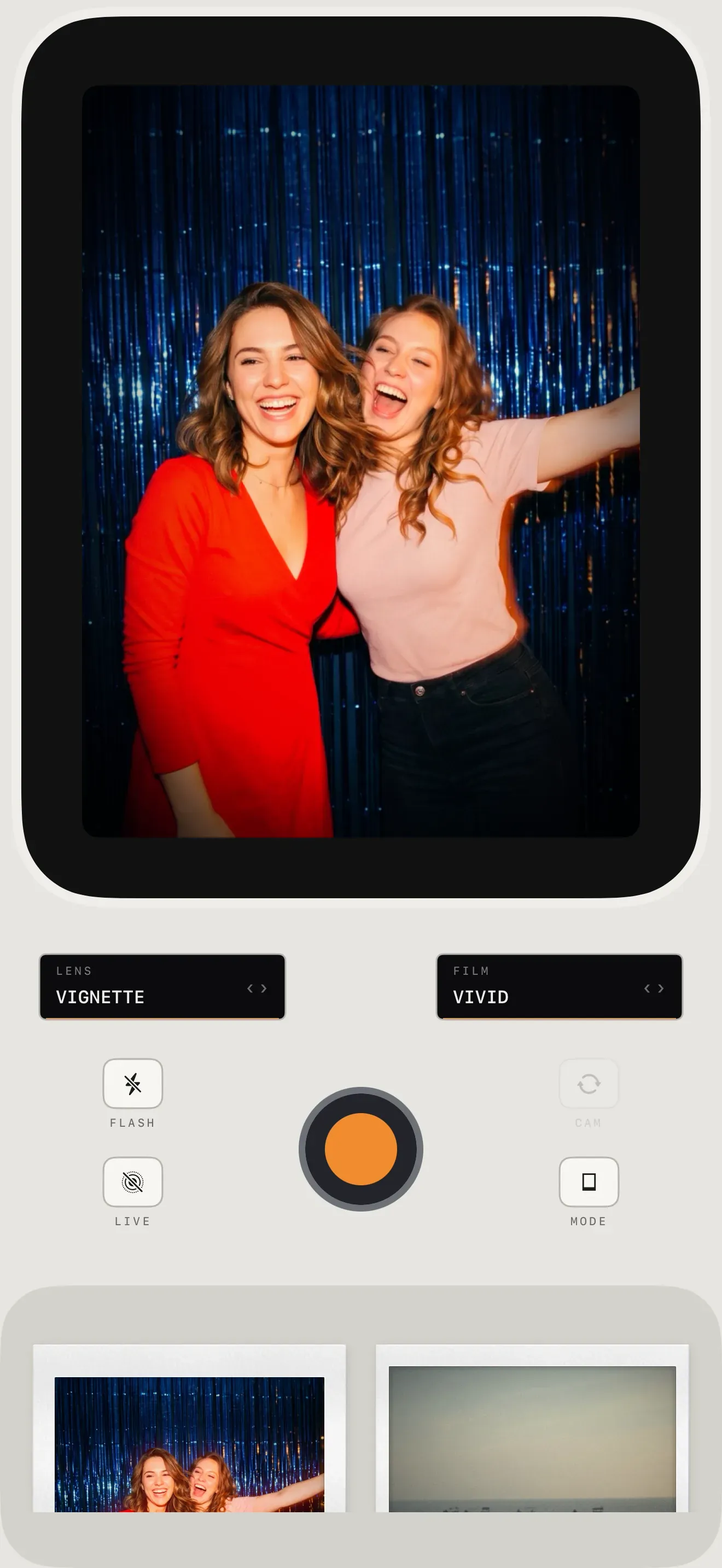
When building Toasto, we ran into the same tension: how do you bring that back to an iPhone without making the camera frustrating to use? Our answer was to split the camera into two dials:
- LENS effects (Double Exposure, Mirror, Crystal, Light Leak, Vignette, Pixel, Screen and others) behave like glass mounted in front of the lens. What you see in the viewfinder is what you get, and the moment you press the shutter the effect is in the photo for good. Same rule as the Pal 2.
- FILM filters (Classic, Vivid, Faded, Mono and others) work the other way. The underlying pixels are kept, so you can swap the filter long after taking the photo.
Now, all thirty Pal 2 effects, so you can decide which ones belong in your six slots.
A note on method: the descriptions are our reading of Fujifilm's official sample photographs, since Fujifilm has published no written descriptions. The "where we'd try it" column is a guess from those samples, not field experience.
Modern: the everyday set
Fujifilm's line: "Rich, natural textures with a contemporary softness."
| Effect | What it looks like | Where we'd try it |
|---|---|---|
| Pure | The baseline: a slight warm push and gently lifted midtones. One early review called it unremarkable, which is the point. | Your neutral slot. |
| Cool | White balance shifted toward blue and cyan. Shadows slightly lifted. | Overcast streets, architecture. |
| Muted | Misleading name. "Muted" suggests washed-out pastels. The sample shows the opposite: higher contrast, deep shadows, heavy greens. Moody rather than desaturated. | High-contrast street scenes. One of the stronger looks in the set. |
| Soft | Diffusion rather than blur: highlights bloom into a haze while detail is kept. | Close portraits, warm interiors. |
| Flare | A burst of light in the upper right, a diagonal rainbow streak, and haze over the whole frame. One early review singled it out as the fun one. | Anything with strong side light. |
| Mono | Neutral black and white, ordinary contrast. | — |
Y2K: old digicams and older screens
"Blends the nostalgic textures of analog with digital freshness."
| Effect | What it looks like | Where we'd try it |
|---|---|---|
| Film | Color negative feel: green-teal shadows, warm highlights, fine grain. | The most all-purpose look here. |
| Digicam | An early-2000s compact: slightly cyan, flat contrast, dull color, a little soft. | Friends, flash, indoors. |
| Lo-Fi | Saturation and contrast pushed until color starts to block. Edges smear a little. | Neon signs, street art. |
| Pixel | Dithering and a reduced palette, by the look of it: a visible dither mesh, and gradients that break into steps. Closer to an old handheld game than to a mosaic. | Simple shapes and big blocks of color. |
| Dusty | Grey haze, lifted blacks, desaturated and a little cyan, slightly soft. Fujifilm's Chinese site calls it "old photo", which is exactly right. | Quiet still lifes. |
| Screen | An old CRT: vertical RGB sub-pixel stripes, scanlines, color fringing at the edges, corners slightly dark. | Faces and bright lights against a dark background. |
Vintage: darkroom processes and faded prints
"Timelessly weighted with a warm and faded charm."
| Effect | What it looks like | Where we'd try it |
|---|---|---|
| Faded | Lifted, milky blacks, collapsed contrast, a warm magenta haze. | Golden hour, beaches. |
| Blueprint | Cyanotype. The whole image becomes one ramp of Prussian blue, with white left white. | Botanicals, silhouettes, architecture. |
| Halftone | Black-and-white newsprint: a dot screen where midtones are carried by dot size. | Bold geometric subjects. |
| Sepia | Brown monochrome with an obvious vignette and light texture. | Predictable, but it works. |
| Antique | Dark, warm, yellow-green, heavy vignette, coarse grain. Noticeably older and moodier than Sepia. | Wooden interiors, flea markets. |
| Midnight | A soft grey monochrome: blacks that never quite sink, a little fog, slightly cold. The gentle opposite of Mono, and the one we'd pick of the two. | Night walks, rain. |
Chromatic: color and light
"A crisp, confident aesthetic featuring nuanced light and elegant color palettes."
| Effect | What it looks like | Where we'd try it |
|---|---|---|
| Summer | Bright, saturated, yellow-green highlights, hard contrast. | Daylight, holidays. |
| Light leak | A band of orange-pink light along the left edge, plus a warm haze over the rest. | Candid shots of people. |
| Dawn | Highlights tinted pink-magenta, with a light mist. | Early mornings, flowers. |
| Twilight | A violet-blue wash over the whole picture. Cold. | Dusk, city lights. |
| Frost | Cyan highlights, whites drifting toward cyan, high contrast. Colder still. | Snow, minimal interiors. |
| Monocolor | A duotone in a single hue. The official sample is pink. | Loud and graphic; posters. |
Fantasy: the strange ones
"Combines the fantastical with soft textures and stimulating colors."
| Effect | What it looks like | Where we'd try it |
|---|---|---|
| Fusion | Cross-processed color: magenta and green pulled apart, saturated, with a glow. | Concerts, parties, night streets. |
| Crystal | A prism filter. The scene repeats as three or four offset, half-transparent ghosts, as if you had a faceted piece of glass in front of the lens. One of the three we went on to build our own version of. | Scenes that are boring straight-on. |
| Jade | A yellow-green tint with soft light. | Gardens, greenery. |
| Candy | Pink and cyan pastels, low contrast, soft. | Selfies, desserts. |
| Aura | A rainbow band running diagonally across the frame, with a light haze. | Harsh overhead sun. |
| Mystic | A magenta-violet cast, darkened corners, soft light. | Dim indoor portraits. |
Which six should go on the dial?
The 30 effects live in the companion app; the camera carries six. You can load one of the five themes as a set, or use the app's Custom slot to pick your own six.
If you don't want to be locked into one look, Custom is the better way to use the camera. Here is the walkaround set we would load, with an alternate for each slot:
- A neutral anchor: Pure (or Film). One slot for when you just want what is in front of you.
- Something kind to faces: Soft (or Candy).
- A light trick: Flare (or Aura). Rainbow streaks and haze on demand.
- A wildcard: Crystal (or Pixel). For when the scene itself is dull.
- A monochrome with mood: Midnight (or Blueprint), instead of plain black and white.
- Something dark and contrasty: Muted (or Light leak).
Fujifilm's own example Custom set, for comparison: Pure, Lo-Fi, Antique, Summer, Crystal, Candy.
What to know before you buy
Beyond the effects dial, a few details are worth knowing before ordering:
- The top screen works as a waist-level finder. By default the 1.30-inch top screen shows an effect card (name, theme, a fixed example photo) when you turn the dial. Reviewers found you can switch it to live view in the menu, hold the camera at belt level and look down into it.
- 10MP or 1MP, as a mood. Fujifilm pitches the 1MP setting (1280×960) as a look rather than a compromise. Worth knowing: over Bluetooth the camera only ever sends 1280×960 anyway, at about 15 seconds per image. USB-C sends the full-size file in under a second.
- WIDE is not instax WIDE. The format lever offers No Frame (4:3), mini (3:4), SQUARE (1:1) and WIDE. WIDE is 16:9, not the 99:62 image area of real instax WIDE film.
- Shutter lag and overexposure. The first hands-on reviews agree on both. Exposure compensation (±2EV) exists, but there is no dial for it; you go through the top-screen menu. One review also missed the double exposure mode from the instax mini Evo.
- USB-C to a computer only charges. To a phone, USB-C moves a full-resolution photo in about 0.7 seconds. Plugged into a computer, reviewers report, it charges and nothing else; to get photos onto a PC you pull the microSD card.
- Two separate 100-shot limits. Internal memory holds about 100 photos whether you shoot 10MP or 1MP. And according to the spec sheet, you can shoot at most 100 photos before the camera has been connected to the app.
- instax Animation. Hold the shutter for up to ten consecutive shots, saved as a flipbook you watch in the app. It can be printed as a QR code on the photo. The FAQ says these expire; Fujifilm doesn't say when.
If it's the ritual you're after
The Pal 2 is a charming object. At about 87 grams you can clip it to a bag, pass it around a dinner table, or hand it to a kid without worrying about a dropped phone. If you already own an instax Link printer, it is an easy thing to want.
It is also an instant camera where nothing develops: the print happens later, at the printer, if at all. If that moment is the part you miss — a sheet sliding out of the camera, a blank frame that only develops when you shake it, peel-apart film you pull open yourself, wide film in the real proportions, double exposures — that is what we built Toasto around, on the phone you already carry. Like a print fresh out of the camera, Toasto is still developing. Give this different kind of toy a try.
Sources
- instax Pal 2 official site — product overview, effect themes, setup.
- instax Pal 2 specifications
- instax Pal 2 FAQ — effects at capture only, Animation expiry.
- Fujifilm press release — theme definitions, Japan release date.
- Early impressions and US pricing: Digital Camera World, The Phoblographer, DPReview, PetaPixel.
instax and related marks are trademarks of FUJIFILM Corporation. Toasto is an independent app and is not affiliated with, sponsored by, or endorsed by FUJIFILM Corporation.